How to Perform a Disney Plus Rip Safely in 2026

If you have ever attempted to save Disney Plus content for permanent storage, you likely share the frustration of users like Marcus, a tech-curious subscriber. Like many, Marcus assumed that hitting “Download” in the app meant he owned a movie file he could watch anywhere. Instead, he found encrypted offline downloads hidden deep in system folders, unreadable by any media player. Realizing that your library is locked behind an app that requires periodic internet check-ins can feel like renting a car you are never allowed to park in your own garage.
This guide addresses the specific technical barriers that cause black screens and hidden files. We provide a verified rip method to bypass Disney Plus download limits, allowing you to secure playable MP4 files that never expire.
How to Rip From Disney Plus
Ripping vs. Downloading: Selecting the Correct Method for Offline Viewing
When attempting to secure media for offline use, you generally have two options: manual screen recording or using a professional downloader. Understanding the technical distinction is vital because one method leads to low-quality frustration, while the other offers a reliable Disney Plus video extraction solution.
Manual Screen Recording (The High-Effort Approach)
Manual screen recording involves capturing the video feed as it plays on your monitor. While this seems straightforward, it faces significant hurdles:
- DRM Blackouts: Disney Plus uses High-bandwidth Digital Content Protection (HDCP). Most screen recorders result in a black screen with audio only.
- Time Consumption: You must play the video in real-time. A 2.5-hour movie takes 2.5 hours to capture.
- Quality Loss: System notifications, buffering, or frame drops will be permanently recorded into the video file.
Professional Downloaders (The Efficient Solution)
Professional tools interact directly with the streaming manifest. They decrypt the incoming stream and save the raw data. This allows for high-speed batch processing without quality loss.
Here is a breakdown of why software solutions offer a distinct advantage over manual efforts:
| Feature | Manual Screen Recording | Professional Downloader |
| Success Rate | Low (Frequent DRM blocks) | High (Bypasses checks) |
| Time Cost | 1:1 (Real-time playback) | 10x Speed (Hardware acceleration) |
| Video Quality | Variable (Screen dependent) | 1080p (Direct source) |
| File Type | Unoptimized Screen Capture | Clean MP4 / MKV |
The Reliable Solution: How to Download Disney Plus as MP4 with Keeprix
To address the common issue where downloads cannot be accessed as MP4 or MKV files via the official app, we recommend using Keeprix Downloader. This professional software serves as a bridge, decrypting the stream and saving it as a standard video file. While this is a paid tool, it is designed specifically to resolve the restrictions of offline viewing Disney+ content, such as expiration dates and device limits.
Follow this procedure to perform a Disney Plus video extraction:
Step 1. Download Keeprix Downloader and install it on your Windows or Mac computer.
Step 2. Launch the software and choose Disney Plus on the main screen.
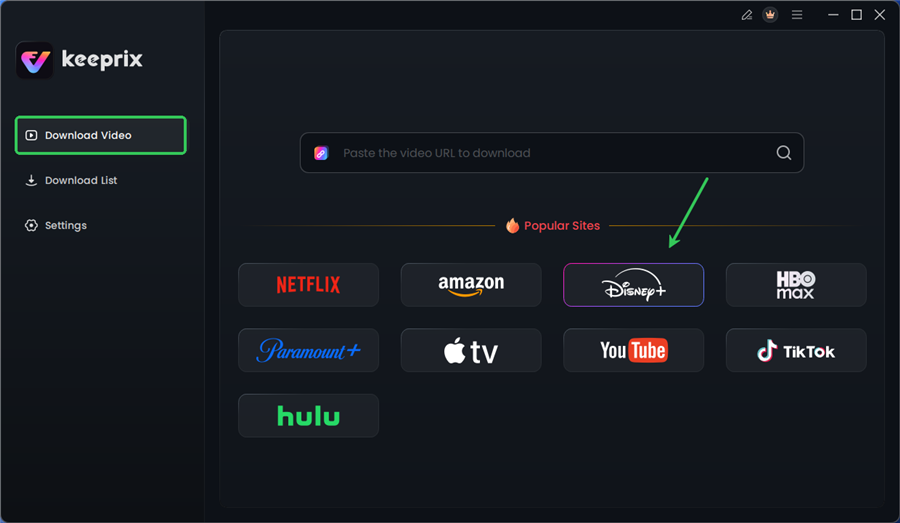
Choose Disney Plus in Keeprix
Step 3. Log in to your Disney+ account.
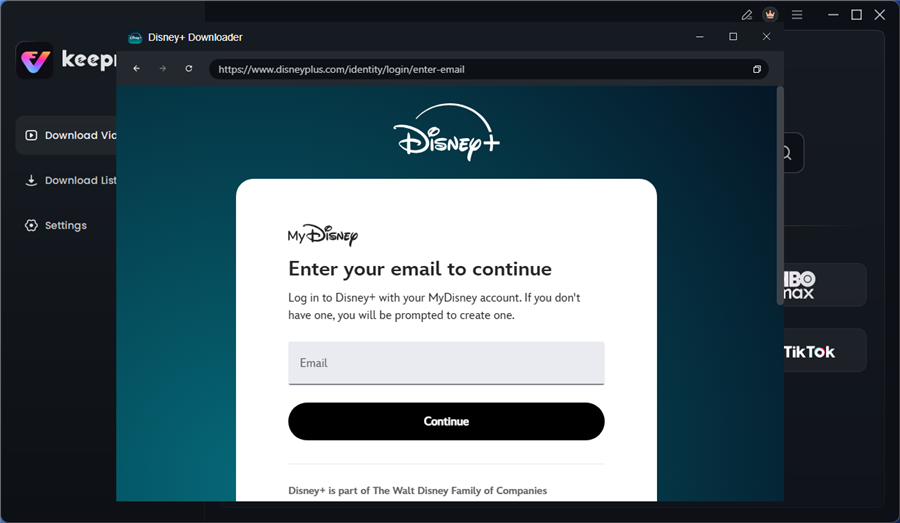
Log in to Disney Plus Account
Step 4. Search for the movies or series you’d like to download. Then click the download button to save it directly to your computer.
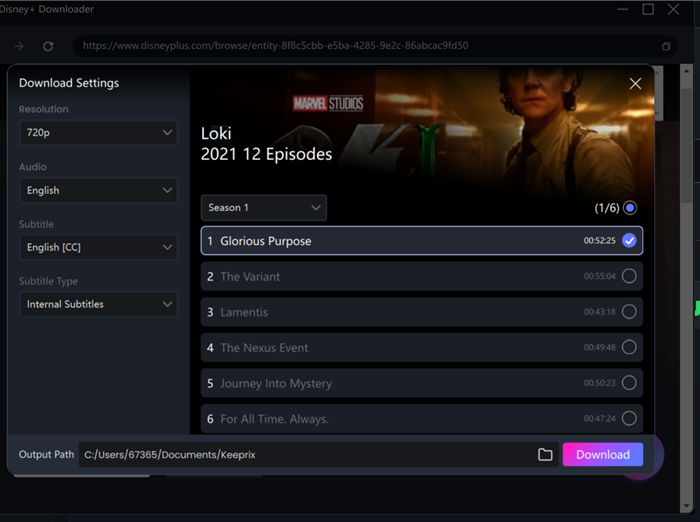
Configure Download Settings
After downloading, you can access the downloads in your local folder. The downloaded content is decrypted in MP4 or MKV format, which you can keep forever.
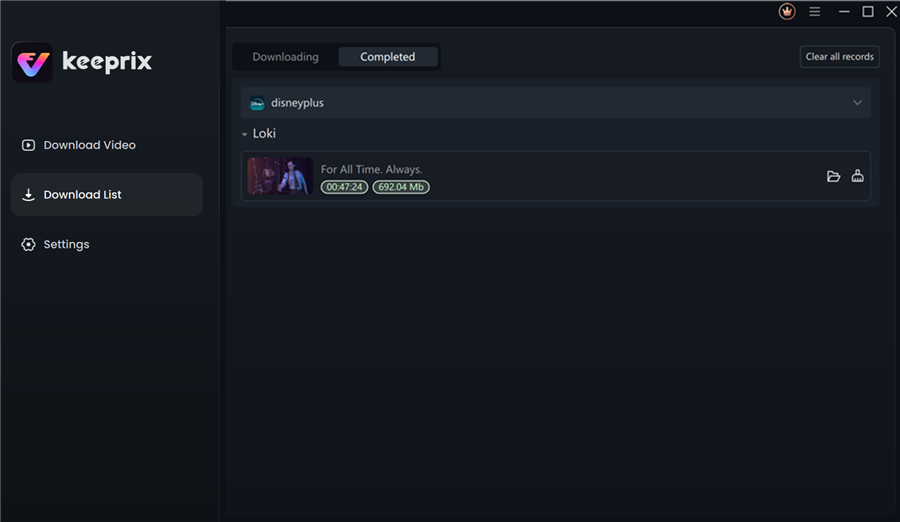
Disney Plus Downloaded Videos in Keeprix
Pro Tip regarding Performance: Because the software uses hardware acceleration, it is resource-intensive. However, in our testing on a standard MacBook Air M2, we were able to browse the web and check emails without significant lag while the download ran in the background.
Transparency Check: Limitations and Trial Details
We believe in full transparency regarding the tools we recommend. While Keeprix is powerful, it is not without limitations:
- The “Free” Trial: The trial version is designed for verification, not full use. It typically limits you to downloading the first 5 minutes of three different videos. This allows you to verify that the quality and audio work on your system before purchasing a license.
- Login Requirement: You must log in to your active Disney+ account within the software. This is required to access the content manifest legally.
- Updates Required: Streaming services change their coding frequently. If a download fails, it usually means the software needs an update patch, which can sometimes result in a day or two of downtime.
Why You Can’t Find Your Downloads: Understanding Disney+ DRM
If you have ever gone digging through your phone or computer’s file system looking for the movie you just downloaded, you likely encountered a confusing mess. You were probably expecting a clear file named The_Lion_King.mp4. Instead, you found a folder filled with unrecognizable, scattered data files.
In this scenario, the obstacle is encrypted offline downloads. Disney Plus does not download a video file in the traditional sense. Instead, it creates a fragmented cache that is locked by multi-layer DRM encryption tied to device hardware keys.
The Hardware Key Mechanism
This means the data on your device is mathematically tied to the specific hardware ID of your phone or tablet. Even if you copy these files to a USB drive or another computer, they remain unreadable because the decryption key is missing. This “Hardware Key” mechanism is why extraction or conversion of offline downloads is technically impossible using standard file managers.
Understanding this limitation is the critical realization for many users: the official app provides access to offline viewing, but it does not grant ownership of the file. To move content freely, you must break the link between the file and the hardware key using software like Keeprix.
The Expiration Problem: Why Offline Content Disappears
One of the most persistent complaints regarding the official Disney+ app is that Disney Plus downloads expire automatically. Even after you have taken the time to download a movie, you do not possess it indefinitely. The platform enforces strict streaming platform restrictions designed to ensure your subscription remains active.
Typically, downloads come with two specific time limits:
- 30-Day Storage Limit: Unwatched downloads may expire 30 days after you save them.
- 48-Hour Watch Window: Once you press play on a downloaded title, you often have only 48 hours to finish watching it before it deletes itself or requires renewal.
Comparing Platform Policies
While nearly all streaming services impose limits, Disney+ is particularly strict regarding the “Watch Window.”
- Netflix: Often allows up to 7 days to finish a title once started, depending on the licensing agreement.
- Amazon Prime: Varies by title, but frequently offers longer viewing windows for rented or downloaded content.
- Disney+: Rigidly enforces the 48-hour limit on almost all downloads. If you are on a week-long camping trip and your kids watch 10 minutes of a movie on Monday, that movie will be unplayable by Wednesday evening unless you reconnect to the internet.
Furthermore, offline content requires periodic account verification. If your device does not connect to the internet to “check in” with Disney’s servers, all downloaded content is rendered inaccessible. This creates a scenario where your content disappears exactly when you need it most.
In contrast, performing a Disney Plus download rip to an MP4 file removes these time bombs entirely. A file extracted via tools like Keeprix sits in your local storage permanently, indifferent to your internet connection status or subscription validity.
Safety and Legal Check: Risky Rippers vs. Private Backup
When searching for terms like “Disney Plus download rip,” you will encounter a high volume of dangerous software. The internet is littered with misleading tools claiming ripping capabilities that are, in reality, vectors for malware.
Avoiding “Free” Traps
Be highly skeptical of “free online converters” or tools that require you to complete surveys before downloading. These sites often promise to save Disney Plus content but deliver adware or ransomware instead. Legitimate decryption requires complex maintenance to keep up with DRM updates, which is why reliable solutions are almost exclusively paid software.
Legal Considerations
Regarding legality, it is vital to understand the distinction between format shifting for personal use and piracy.
- Terms of Service: Bypassing DRM is a violation of the Disney+ Terms of Use, which can technically result in account suspension, though this is rare for private users.
- Copyright Law: In many jurisdictions, creating a personal backup of media you have legally paid for falls into a legal gray area known as “fair use” or “private copy exception.” However, distributing these files, sharing them on torrent sites, or selling them is strictly illegal.
Always ensure you use Disney Plus video extraction tools strictly for personal archiving and private offline viewing to remain within ethical and legal safety zones.
Frequently Asked Questions About Ripping Disney Plus
1. Can Disney Plus videos be ripped or extracted?
Yes, but not through the official app. You must use third-party software like Keeprix to decrypt the stream and save it as a standard video file. This process is often referred to as a Disney Plus download rip.
2. Why can’t I find Disney Plus downloads in my file manager?
The official app does not save videos as identifying files (like .MP4). Instead, it stores the content as fragmented, encrypted data files hidden within the application’s system folders. These files are useless outside the Disney+ app.
3. How does DRM prevent Disney Plus content from being saved?
Disney uses DRM-protected streaming protocols that require a handshake between your device’s hardware key and the Disney server. If the keys do not match, the content will not play, preventing you from simply copying the files to another drive.
4. Do Disney Plus downloads expire?
Yes. Official downloads typically expire after 30 days or 48 hours after you begin watching. Offline viewing Disney+ content requires a periodic internet connection to verify your subscription.
5. Can I transfer Disney Plus downloads to another device?
Official downloads cannot be transferred. However, if you use a tool to extract the video as an MP4, you can transfer that file to any device, USB drive, or server without restriction.
6. What format does Disney Plus use for downloads?
Disney Plus uses a proprietary, encrypted cache format. It is not a standard video container like AVI or MOV. To get a standard format, you must perform a Disney Plus file format conversion using a downloader.
7. Are tools claiming Disney Plus ripping safe?
Many free tools are unsafe. Avoid “online downloaders” that require no installation, as they often host malware. Stick to reputable, paid software that is regularly updated to handle Disney Plus file format changes safely.
Conclusion
The frustration of dealing with encrypted offline downloads and Disney Plus videos expiring automatically is a solvable problem. You do not have to accept that the content you pay for is locked to a single device or a temporary timeline. By understanding the DRM-protected streaming restrictions and using a verified tool like Keeprix Downloader, you can regain control over your media library.
We recommend Keeprix Downloader because it directly resolves the core issues of portability and ownership. It allows you to save Disney Plus content as high-quality MP4 files, strip away ads, and eliminate the risk of files disappearing when you are offline. If you are ready to build a permanent, accessible video library, download the trial version of Keeprix today—keeping in mind the 3-video limit—and test the process for yourself.