Can I Watch Disney Plus Abroad? The Verified Travel Guide

Imagine arriving at your hotel in Spain, ready to unwind as our reader Emily did. She opened her laptop, expecting to pick up her favorite series exactly where she left off, only to find the “Continue Watching” list empty. It wasn’t a glitch; it was a licensing wall. Facing a locked library when you need relaxation most can be a significant obstacle.
For many subscribers, the question “can I watch Disney Plus abroad?” arises only after they have already landed at their destination. The short answer is yes, you can use Disney Plus overseas, but the experience often differs significantly from what you are accustomed to at home. Whether you are traveling for business or taking a vacation, your access to content depends heavily on your geographic location and the device you are using.
This guide clarifies how international streaming rights work, which countries actually support the service, and provides verified methods, including using a Disney Plus downloader.

Can You Watch Disney Plus Abroad
Why Is the Disney Plus Library Different When I Travel?
Understanding why your content disappears requires a look at the mechanics of international streaming rights. Disney+ geo-restrictions are not arbitrary; they are the result of complex legal contracts. When you open the app in a new country, it detects your IP address and automatically serves the library licensed for that specific region.
In Emily’s case, the show she wanted to watch in Spain was likely licensed exclusively to a local Spanish broadcaster or a rival streaming service in that territory. Until that contract expires, Disney+ cannot legally stream that title in Spain, even to a US subscriber. This leads to content library differences that confuse many travelers.
The “Offline” Trap: Why Native Downloads Can Fail
Here is a critical piece of background knowledge that many users miss: Native downloads often fail to work abroad.
You might assume that downloading a movie within the official Disney+ app keeps it safe, but this is not always true. Disney+ content availability is tied to country-specific licensing agreements. Even offline downloads are programmed to “revalidate” their licenses periodically when your device connects to the internet.
If you connect to Wi-Fi in a country where the downloaded title is not available, the app may recognize the conflict and lock the content, rendering it unplayable.
Where Does Disney+ Actually Work? (Supported Countries List)
Before you worry about downloads, you need to know if the app will open at all. One of the biggest stressors for travelers is the vague promise that Disney+ is available “in over 100 countries.” That isn’t helpful when you are standing in an airport in Vietnam, wondering if your subscription works.
The Major Supported Regions
Generally, if you are traveling to these regions, you can stream, though the library will change to the local version:
- North America: USA, Canada.
- Latin America: Brazil, Mexico, Argentina, Colombia, Chile, Peru, and most major markets.
- Asia-Pacific: Australia, New Zealand, Japan, Singapore, South Korea, Taiwan, Hong Kong.
- Europe: UK, France, Germany, Italy, Spain, Netherlands, Switzerland, and Scandinavia.
The “Danger Zones” for Travelers
There are significant gaps in coverage where the Disney+ app simply will not work (Error Code 73) or operates under a completely different app ecosystem (like Disney+ Hotstar).
- Vietnam: Currently generally unsupported or requires a different localized service.
- Thailand, Indonesia, Philippines, India: These regions often use “Disney+ Hotstar.” Your standard US/EU Disney+ account may not log in to the Hotstar app, and the Hotstar app is a separate download.
- China: Service is unavailable.
- Parts of the Middle East & Africa: Coverage is expanding but spotty compared to Europe.
If you are traveling to a “Danger Zone,” standard streaming will not work. You must rely on permanent offline downloads stored externally, as discussed later in the guide.
Streaming vs. Downloading: Choosing the Best Way to Watch
When planning how to access media during a trip, users generally face two choices: relying on local roaming or preparing content via offline downloading. While streaming seems convenient, it introduces variables that can disrupt your viewing experience.
Option 1: Relying on Local Roaming (The Casual Method)
This method involves simply logging into the Disney+ app upon arrival.
- Pros: No prep work required.
- Cons: Subject to Disney Plus region availability. If a show is not licensed in your destination, it vanishes. You also face potential bandwidth caps at hotels.
- Best for: Travelers going to major markets (UK, Canada) who aren’t picky about specific shows.
Option 2: The EU Portability Benefit (For European Residents)
If you are a resident of an EU country traveling to another EU country, you have a distinct advantage. Under EU portability regulations, you see your home version of Disney+ with no changes to the library.
Checklist:
- Is your account registered in an EU country?
- Are you traveling temporarily to another EU country?
- Result: No changes needed. You can watch exactly as you do at home.
Option 3: Permanent Offline Downloading (The Professional Method)
For travelers going to unsupported regions or those who need specific shows guaranteed, relying on the app is risky. A professional approach involves securing content as permanent files using specialized tools like Keeprix Downloader.
| Criteria | Local Roaming / Streaming | Permanent Offline Downloading |
| Content Availability | Subject to local region (Variable) | Fixed (Guaranteed availability) |
| Reliability | Dependent on Wi-Fi speed | 100% (No internet needed) |
| Expiration Limits | None (as long as you are online) | None (Files are yours forever) |
| Works in Unsupported Countries | No (Error Code 73) | Yes (Files play on any media player) |
The Hidden Hurdle: App Store & Payment Lockouts
Beyond just watching content, many travelers face a technical lockout they didn’t anticipate: App Store unavailability.
The “Missing App” Scenario
If you delete the Disney+ app to save space, or if you get a new phone while traveling, you might try to redownload it from the App Store or Google Play Store.
- The Problem: If you are connected to a local network in an unsupported country, or if your phone’s region settings drift, the Disney+ app may simply not appear in the store.
- The Fix: Do not uninstall the app while traveling. Ensure it is updated before you leave your home country.
Payment Method Failures
If your subscription expires mid-trip, renewing it can be a headache. Disney+ requires a payment method that matches the country of your IP address.
- The Issue: You cannot use a US credit card to renew a subscription while your IP address says you are in France.
- The Fix: Set your subscription to auto-renew or buy a 12-month plan before traveling to avoid payment gaps.
How to Watch Anywhere on Any Device
For travelers who need certainty, especially those visiting regions where the app doesn’t work or who watch primarily on tablets and phones, the most robust solution is Keeprix Downloader.
While the native Disney+ app is great for home use, its travel limitations (geo-blocking and license expiration) can be frustrating. Keeprix is a desktop tool that downloads Disney+ videos as standard video files. Crucially, these files can be moved to any device, iPad, Android, or laptop, and will play without an internet connection or an app.
Steps to Download Disney+ Videos with Keeprix Downloader:
Step 1. Download Keeprix Downloader and install it on your Windows or Mac computer.
Step 2. Launch the software and choose Disney Plus on the main screen.
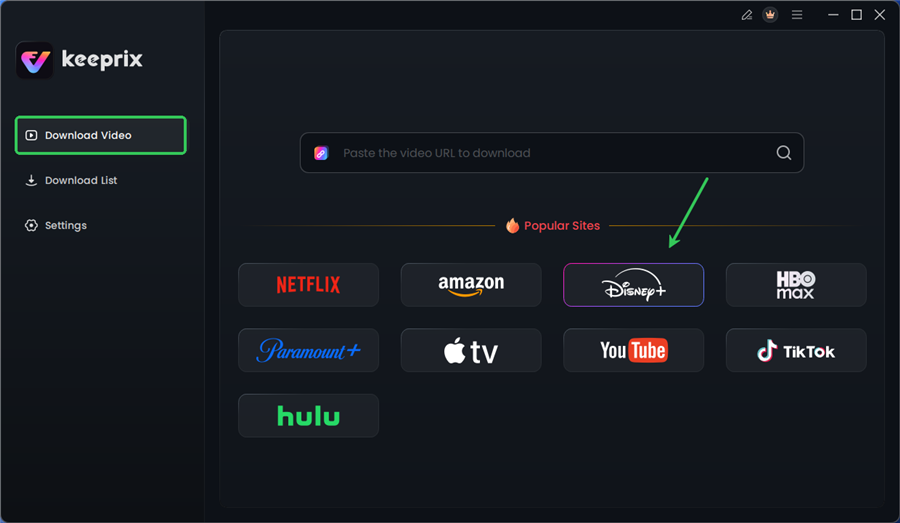
Choose Disney Plus in Keeprix
Step 3. Log in to your Disney+ account.
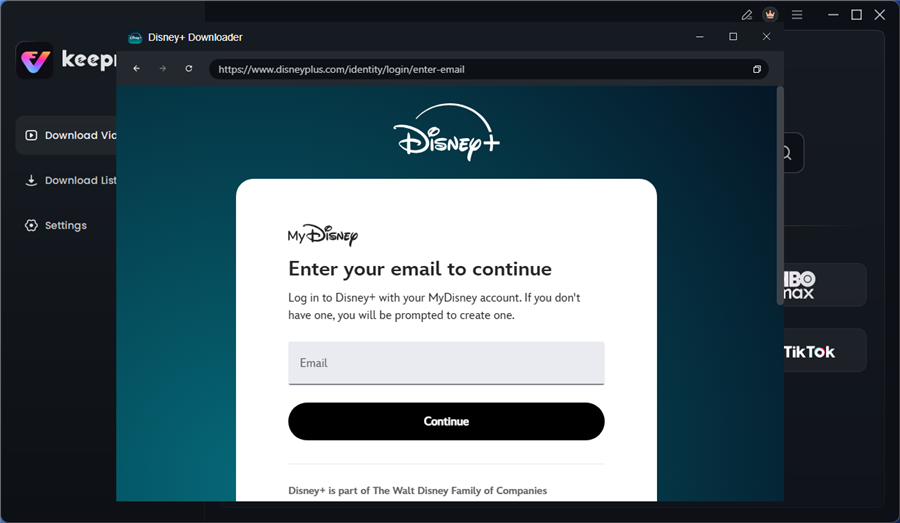
Log in to Disney Plus Account
Step 4. Search for the movies or series you’d like to download. Then click the download button to save it directly to your computer.
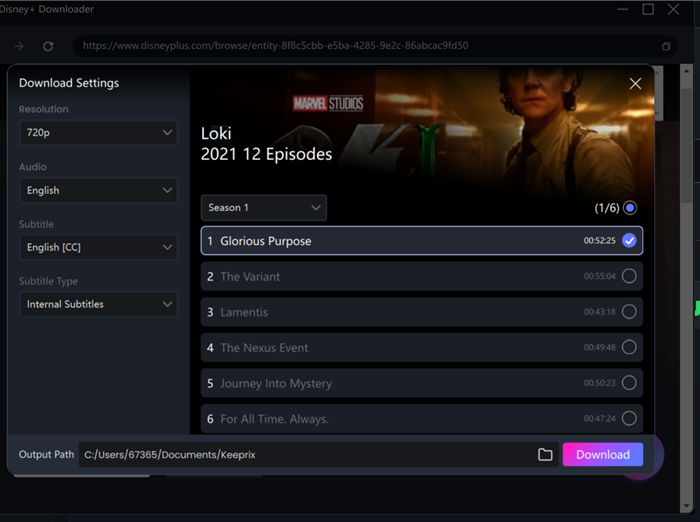
Configure Download Settings
After downloading, you can access the downloads in your local folder. The downloaded content is decrypted, and you can keep it forever. By following this method, you create a travel-proof media library that works independently of your location.
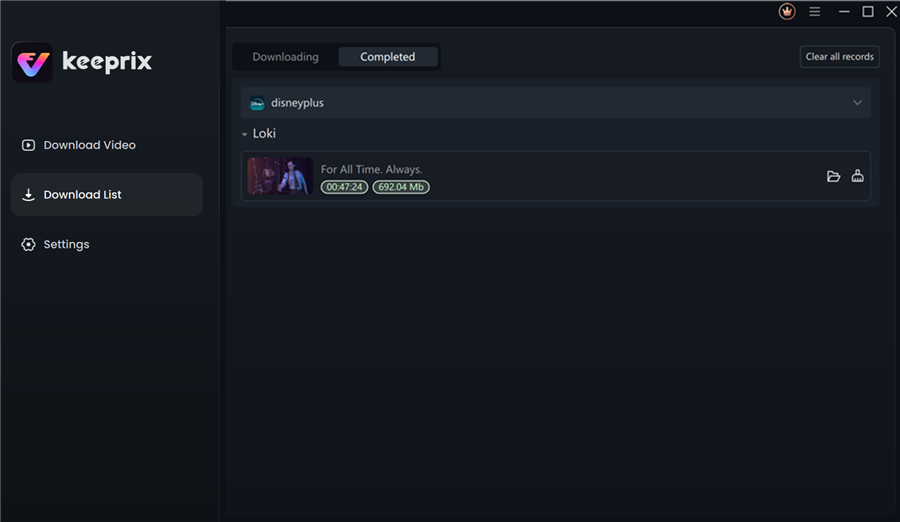
Disney Plus Downloaded Videos in Keeprix
FAQ: Common Questions About International Disney Plus Access
1. Can I watch Disney Plus abroad with my current subscription?
Yes, generally. You do not need a new subscription. However, the content library will switch to the local version of the country you are in. If you visit a country where Disney+ is not supported, the app will not work.
2. How do I watch my downloaded movies on my iPad if I use Keeprix?
Keeprix downloads files to your computer. To watch on an iPad, connect your iPad to your computer and use the “File Sharing” feature in iTunes or Finder to copy the video files into a player app like VLC. This bypasses the Disney+ app entirely.
3. Does Disney Plus work in every country?
Does Disney Plus work in other countries? No. It is available in major markets across North America, Europe, and Latin America. However, many Asian and African countries are either unsupported or operate on a different “Hotstar” system that may not accept your login.
4. Why is the Disney Plus library different when I travel?
Libraries differ because copyright laws are region-specific. Disney may have sold the broadcasting rights for a specific movie to a local TV station in your destination, preventing them from showing it on Disney+ there.
5. Will my native app downloads work while abroad?
It is risky. If you connect to the internet in a region where your downloaded content is unlicensed, the app may lock the file. To avoid this, keep your device in “Airplane Mode” while using the Disney+ app, or use third-party downloads that don’t require app verification.
6. Do I need to change my Disney Plus region?
No, and usually you can’t manually change it. The app automatically detects your location via IP address.
Conclusion: Take Control of Your Entertainment
Don’t let “content library changes when traveling” dictate your vacation entertainment. As Emily discovered, relying solely on the native app allows regional licensing to control your viewing experience.
If you are traveling to a supported region like the UK or France, you can likely get by with the standard app, provided you don’t mind a slightly different library. However, if you are heading to unsupported regions, have limited data, or simply want to ensure your kids have their favorite shows on the flight, shifting to permanent offline downloading with Keeprix Downloader removes these variables entirely.
By securing your media as standard files and transferring them to your tablet or phone, you ensure that you are never left looking at a blank screen or a specific error code. Take control of your media library today to ensure your next trip is filled with entertainment, not troubleshooting.