Disney Plus to MP4: A Verified Guide for Offline Viewing

You have likely experienced this specific frustration: You download a movie on the Disney+ app for a long flight or a weekend trip, turn off your Wi-Fi to test it, and realize the file is trapped. You cannot find it in your file manager, you cannot move it to a USB drive, and you certainly cannot play it on your Plex server.
If you search for how to save Disney+ video as MP4, you often find outdated advice or misleading tools. The reality is that official downloads are not video files; they are fragmented, encrypted cache data hidden deep within the app’s system folders.
To solve this, we moved beyond theory. This guide is based on hands-on testing to verify which methods actually result in playable, portable files. We tested free screen recorders, browser extensions, and premium downloaders to see which ones could genuinely bypass the restriction of the Disney Plus to MP4 process.

Disney Plus to MP4
You may also like: How to screen record Disney Plus
The Technical Reality: Why You Can’t Just “Convert” Cache Files
Before we look at the solution, it is vital to understand why standard file converters fail. Most users assume that if they can locate the downloaded file on their phone or PC, they can simply rename it or use a free converter to make it an MP4.
This fails because of Hardware-Bound DRM (Digital Rights Management).
When you download a video via the official Disney+ app, the data is encrypted using keys that are mathematically tied to your specific device’s unique hardware ID.
- The Lock: The video file is the “lock.”
- The Key: Your specific phone or laptop’s processor ID is the “key.”
If you copy that cache file to a different computer, or even try to open it with a different player on the same computer, it will not play. It is effectively gibberish data without the official app acting as the real-time translator. This is why you must use a tool that decrypts the stream during the download process, rather than trying to convert the file afterward.
Comparison: Screen Recording vs. Direct Downloaders
When we began testing ways to download Disney Plus MP4 files, we categorized the tools into two groups: Screen Recorder (like OBS) and Disney Plus downloader.
Why “Free” Tools and Screen Recorders Failed
We first attempted to use OBS Studio and several “free” browser extensions to capture content. The results were poor:
- The Black Screen Issue: Streaming services utilize streaming service encryption that detects screen capture software. In 90% of our OBS tests, the result was a black screen with audio only.
- Quality Degradation: Even when we bypassed the black screen using hardware acceleration toggles, the recording suffered from dropped frames.
- Browser Extensions: We tested three popular Chrome extensions claiming to download Disney+. Two were flagged as malware by Windows Defender, and the third only downloaded a low-resolution trailer, not the full movie.
The Professional Method: Direct Stream Access
In contrast, professional tools designed to save Disney+ video as MP4 access the data stream directly. Instead of recording the screen pixel-by-pixel, they request the video data from the server and decrypt it on the fly.
- Speed: Because it is downloading data, not recording playback, a 2-hour movie can download in roughly 15 minutes (depending on your bandwidth).
- Audio Integrity: This method preserves the original 5.1 Surround Sound audio tracks, whereas screen recording typically compresses audio into stereo.
The Verified Solution: Using Keeprix Downloader
After filtering out the tools that failed or posed security risks, we found Keeprix Downloader to be the most consistent solution. It is a professional software specifically engineered to bridge the gap between encrypted streams and open video files.
Note on Cost: Unlike video converters, Keeprix is a premium software solution. However, it offers a free trial that allows you to download full videos (usually the first 3 videos or a specific duration) so you can verify the quality and playability on your devices before purchasing a license.
Why We Recommend It
Keeprix resolves the core issues we identified during testing:
- Bypassing the Hardware Lock: It decrypts the stream and saves it as a standard MP4 or MKV file. This means the file is no longer tied to your computer—you can put it on a USB stick and plug it into a TV.
- Batch Efficiency: If you are archiving a series like The Mandalorian, you can add an entire season to the queue. The software processes the list automatically, removing ads if you are on an ad-supported tier.
- Permanent Ownership: Standard Disney+ downloads expire if you go offline for 30 days. Keeprix files never expire.
Step-by-Step: How to Download Disney Plus MP4 Files to Your PC
The following procedure outlines how to use Keeprix to extract a Disney Plus MP4 file directly to your computer.
1. Installation and Setup
Download and install the Keeprix Downloader on your Windows or macOS device. Launch the software and select “Disney+” from the main interface.
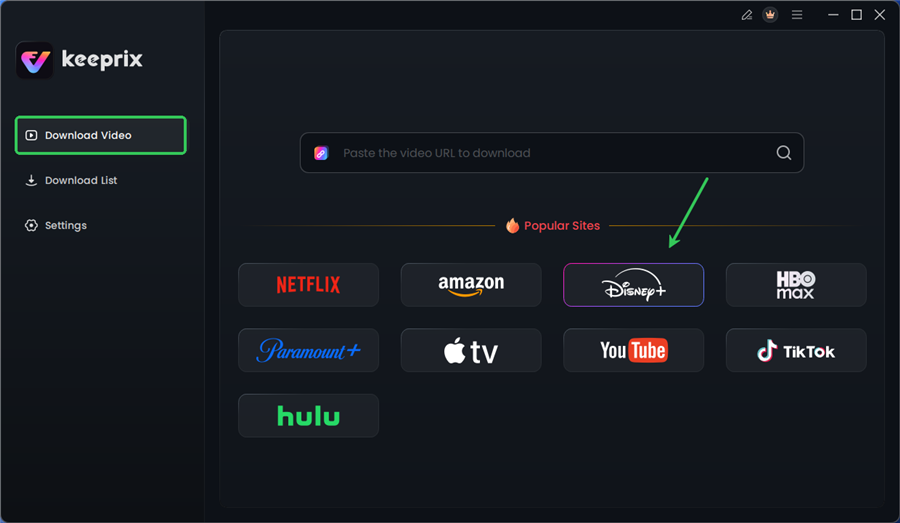
Choose Disney Plus in Keeprix
2. Log In to Disney+ (Securely)
The software will open a built-in browser window, navigating to the Disney+ login page.
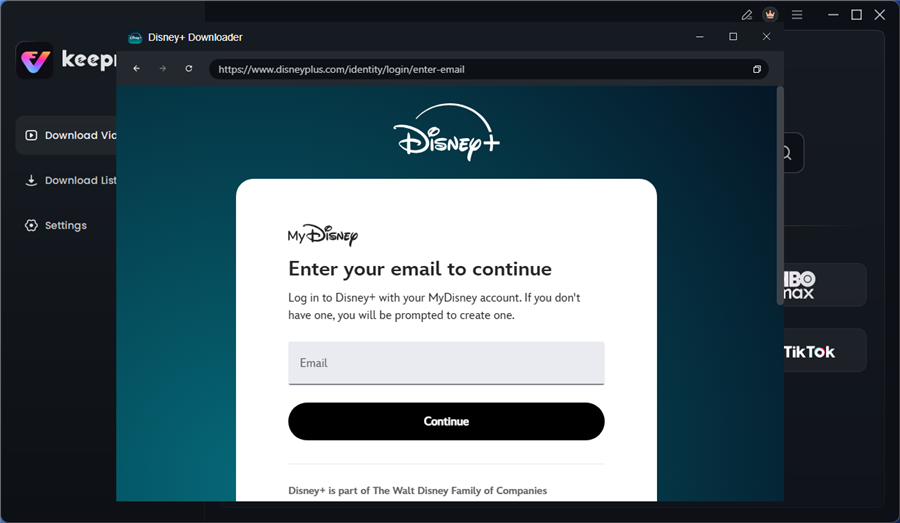
Log in to Disney Plus Account
Security Note: You may hesitate to enter credentials into third-party software. Keeprix uses a secure, sandboxed browser instance. This means the software does not store or “see” your password; it simply acts as a bridge to pass the login token from Disney+ to the downloader, ensuring your account details remain encrypted and private.
3. Select Your Content
Navigate to the movie or TV show episode you wish to download and play the video. Keeprix will automatically analyze the video URL in the background. Within seconds, a configuration window will appear.
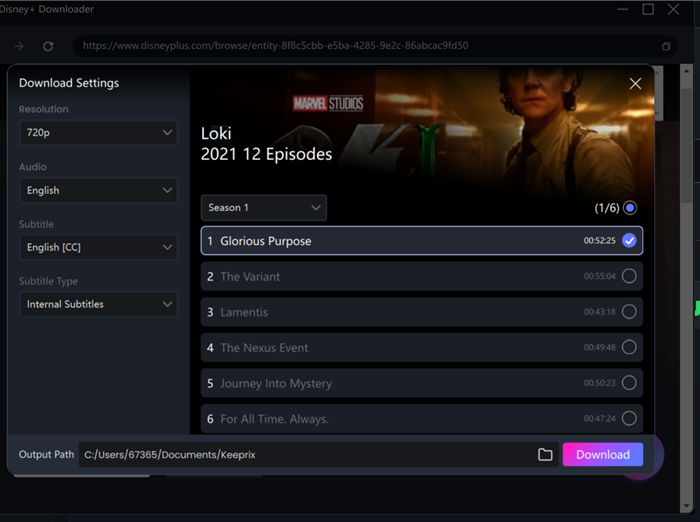
Configure Download Settings
4. Configure Output Settings
Before initiating the download, you can customize the file. This is where you ensure the file meets your quality standards:
- Resolution: Select 1080p for the highest quality.
- Audio & Subtitles: Choose your preferred languages. We recommend saving subtitles as “Remux into file”—this allows you to turn subtitles on or off in your media player, just like a DVD.
- Output Location: Define where the file should be saved (e.g., directly to a connected USB drive).
5. Start the Download
Click “Download Now.” Once finished, you will have a standalone MP4 file in your selected folder. You can now close the software, disconnect your internet, and play the file to confirm it works.
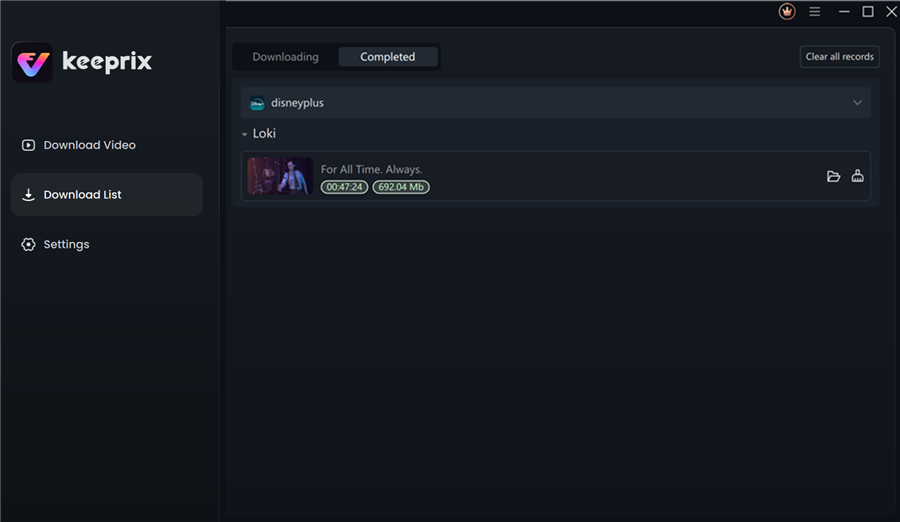
Disney Plus Downloaded Videos in Keeprix
Is This Just a Disney+ Problem? (Platform Comparison)
You might wonder if these restrictions are unique to Disney. In our analysis of the streaming landscape, we found that strict offline download restrictions are the industry standard, not an exception.
All major platforms use similar DRM technologies (Widevine or PlayReady) to bind content to the device. The method described in this guide for Disney+ often applies to these other platforms as well, provided the downloader tool supports them. This confirms that to build a truly permanent, portable library, you cannot rely on the official apps of any of these services.
Understanding Legal and Ethical Offline Viewing
When dealing with protected streaming files, it is essential to navigate the legal and ethical landscape responsibly.
The Distinction: Personal Use vs. Distribution
The intended use of tools like Keeprix is to facilitate “format shifting” for personal convenience—similar to ripping a CD you own to listen to on an MP3 player. This allows you to watch content you have legally paid for on devices that may not support the official app (like older smart TVs or projectors) or in environments with zero connectivity.
However, guidance on legal offline viewing alternatives is clear: Distribution is illegal.
- Do: Watch the file on your iPad during a flight.
- Do: Back up the file to your personal NAS server.
- Do Not: Upload the converted MP4 files to file-sharing sites or torrents.
- Do Not: Share the files with friends who do not have a subscription.
By keeping your converted files strictly for your own personal, private use, you respect the content creators while enjoying the flexibility you paid for.
Disney Plus Download FAQs
Can I convert existing Disney+ downloads on my phone to MP4?
No. This is a common misconception. If you have already downloaded videos using the official Disney+ app, those files are heavily encrypted and tied to your device’s hardware ID. You cannot retroactively convert them. You must use a tool like Keeprix to re-download the stream directly as an MP4 file.
Why do some online tools claim to convert Disney+ to MP4 for free?
Many “free” online converters are misleading. They typically work for unencrypted sites like YouTube but fail against streaming service encryption. Be extremely cautious of “free” tools that ask for your Disney+ login credentials without a verifiable security protocol (like sandboxing), as they pose a significant phishing risk.
Does Disney Plus allow permanent offline viewing?
Officially, no. Content on the official app expires after a set period (usually 30 days, or 48 hours after you press play). To achieve permanent offline viewing, you must convert the stream to a local file using a dedicated downloader.
Is the quality really 1080p?
In our testing with Keeprix, yes. We verified that the output files were 1920×1080 resolution. However, the available quality depends on the source material; older cartoons may only be available in 720p or 480p from Disney directly.
Update Policy: Streaming platforms update their DRM encryption frequently. Keeprix actively updates its software to match these changes. We recommend checking for software updates monthly to ensure continued functionality.
Final Thoughts: Securing Your Media Library
The frustration of having “locked” media is real. You pay for a subscription, yet you are restricted on where and when you can watch your favorite movies. By understanding the technical barriers—specifically the hardware-bound encryption—you can see why standard converters lead to dead ends.
While offline download restrictions make direct copying impossible, professional tools like Keeprix provide a verified solution. It was the only tool in our testing that successfully navigated the security layers to deliver a clean, sync-perfect MP4 file.
If you are looking to build a permanent backup of your favorite shows, we recommend downloading the trial version first. Test it on one movie, verify the file on your TV or tablet, and experience the difference of true offline freedom.