Does Disney Plus Have Ads? Complete Guide

For a budget-conscious viewer, few things are more frustrating than settling in for a movie night, only to be jolted out of the experience by a loud commercial break. You want to subscribe to Disney+ at the lowest possible cost, but the marketing language around bundles and tiers often creates confusion. You might find yourself asking, “If I pay for the service, why am I still seeing commercials?”
If you are struggling with uncertainty about whether Disney Plus includes ads, you are not alone. The shift from a purely ad-free model to a complex tiered system has left many subscribers unsure of what they are actually paying for. This guide explains exactly how the Disney+ ad-supported plan works, breaks down the actual costs for 2025, and provides a clear comparison of your options—including verified settings to manage your viewing experience with a Disney Plus downloader.
Does Disney Plus Have Ads
The Short Answer: Yes, But It Depends on Your Plan
If you are searching for “does Disney Plus have ads,” the answer is yes—but strictly for the specific “Basic” subscription tier. As of 2025, Disney+ operates on a dual-structure model. You have two primary choices:
- Disney+ Basic (With Ads): Lower monthly cost, includes commercial interruptions.
- Disney+ Premium (No Ads): Higher monthly cost, no commercials.
This tiered approach allows you to choose between saving money and saving time.
Nina’s Story: The Budget Subscriber’s Dilemma
One of the Disney Plus subscribers, Nina, initially feared that commercials were unavoidable across the board. Her frustration peaked when she realized that saving money meant tolerating interruptions during The Mandalorian. However, as she discovered, understanding the specific trade-offs of these streaming subscription tiers is the first step to controlling your viewing experience. Below, we break down the costs so you can decide if the savings are worth the commercials.
You may also like: How to download Disney Plus videos to MP4
Disney+ Ads Explained: 2025 Pricing and Experience
To navigate the Disney+ ad-supported plan, you need to look beyond the marketing terms and look at the numbers and the actual user experience.
2025 Price Comparison Table
Is the annoyance of ads worth the savings? Here is the breakdown of the current standalone pricing.
| Feature | Disney+ Basic (With Ads) | Disney+ Premium (No Ads) |
| Monthly Cost | $9.99 | $15.99 |
| Annual Option | Not typically available | ~$159.99/year |
| Ad Experience | ~4 minutes of ads per hour | None (on-demand) |
| Downloads | No offline viewing | Yes (Mobile/Tablet) |
| Audio Quality | 5.1 Surround Sound | Dolby Atmos (Immersive) |
| Video Quality | Up to 4K UHD | Up to 4K UHD & HDR |
Note: Prices are subject to change by region and active promotions.
What is the Ad Experience Actually Like?
Many guides tell you that ads exist, but few explain how they appear. During our testing on the Basic plan, here is exactly what we found:
- Visual Indicators: When you play a movie, the timeline (scrubber bar) displays small yellow markers. These indicate exactly where commercial breaks will occur.
- Pre-Roll vs. Mid-Roll: You will typically see a 30-to-45-second ad before the content starts (pre-roll). Mid-roll ads occur during natural scene breaks, usually lasting 60 to 90 seconds.
- No Skipping: Unlike YouTube, there is no “Skip Ad in 5 seconds” button. You must watch the full duration.
- The Countdown: A small timer appears in the top corner of the screen, indicating how many seconds remain in the ad break.
- Volume: In our tests, ad volume was normalized, meaning commercials were not significantly louder than the movie dialogue—a common annoyance on other platforms that Disney seems to have managed well.
Plan Selection Is the Only Factor
A common misconception is that using a specific device, such as an Apple TV or a gaming console, might allow you to bypass commercials on the Basic plan. Here is a critical insight: Disney introduced ads as part of a tiered subscription model, making your account status the sole factor determining whether ads appear.
If you are on the Disney+ commercial tier, you will see ads on your phone, your smart TV, and your web browser equally. There is no specific device loophole.
Navigating the Bundle Confusion
A major source of frustration stems from misunderstanding Disney bundle options. Many users subscribe to a “Disney Bundle” assuming that if one service is ad-free, they all are. This is rarely the case.
The “Duo” and “Trio” packages have very specific configurations. Use the matrix below to verify exactly what you are getting before you buy.
Bundle Ad Matrix (2025)
| Bundle Name | Disney+ Ads? | Hulu Ads? | ESPN+ Ads? |
| Duo Basic | ✅ Yes | ✅ Yes | N/A |
| Duo Premium | ❌ No | ❌ No | N/A |
| Trio Basic | ✅ Yes | ✅ Yes | ✅ Yes (Always) |
| Trio Premium | ❌ No | ❌ No | ✅ Yes (Always) |
Key Takeaway: Even if you pay for the most expensive “Trio Premium” bundle, ESPN+ will always have ads because it includes live sports and linear broadcasting. This is not a glitch; it is the nature of live content.
Regional Differences and Live Content
While the ad-supported tier is standard in the US, regional differences in ad availability play a significant role.
- Europe & Canada: Following the US rollout, these regions now have similar “Standard with Ads” vs. “Standard” vs. “Premium” structures. However, the annual pricing discounts for ad-supported plans often vary by country.
- Live TV: Regardless of your region or Premium status, live streams (such as the Oscars or live sports events) retain commercial breaks embedded in the broadcast feed.
Troubleshooting: Why Am I Still Seeing Ads?
It is incredibly disorienting to pay $15.99 for a Premium service and still encounter interruptions. If you find yourself asking, “Why am I still seeing ads?” despite upgrading, check these three common culprits:
Reason 1. Accidental Plan Changes
Third-party billing partners (like Verizon or T-Mobile) sometimes offer free Disney+ perks that default to the Basic tier. If you recently changed mobile plans, your Disney+ tier may have reverted.
Reason 2. Profile Settings
Ensure you are not viewing content on a profile restricted by Junior Mode in a way that serves specific promoted content, though this is rare.
Reason 3. Cached Data
Occasionally, the app caches your old permissions. Sign out of the Disney+ app on your TV and sign back in to refresh your Premium status.
How to Verify Your Status
Navigate to Account Settings on a desktop browser. Look specifically under the Subscription header. It must explicitly say “Premium (No Ads).” If it says “Disney+ Basic,” you are on the lower-tier plan.
Alternative Method: Building a Permanent Library
Most users will simply choose between the Basic or Premium plans detailed above. However, there is a third option for users who want to avoid recurring subscription fees entirely while maintaining an ad-free experience. This involves shifting from a rental model to an ownership model using video downloading software.
The Permanent Approach with Keeprix
While the Disney+ Premium plan allows downloads, they are temporary—they expire if you cancel your subscription or don’t connect to the internet every 30 days. Tools like Keeprix Downloader enable you to download video files directly to your Windows or Mac computer as permanent MP4 Files.
Why Consider Keeprix Downloader?
- Ad Removal: The software processes the video stream and removes commercial breaks during the download, even if you are logged in with an ad-supported account.
- Permanence: You keep the files forever, even if you cancel Disney+.
- Cost: While Keeprix is a paid software, it can be more cost-effective in the long run than paying the extra $6 per month for Premium indefinitely.
Is this for you?
If you are strictly a casual viewer, sticking to the official Disney+ Premium plan is simpler. However, if you are building a media server or want to watch shows offline on a laptop without expiration dates, this tool offers a technical workaround to the ad problem.
Steps to Download Disney+ Videos with Keeprix Downloader
Step 1. Download Keeprix Downloader and install it on your Windows or Mac computer.
Step 2. Launch the software and choose Disney Plus on the main screen.
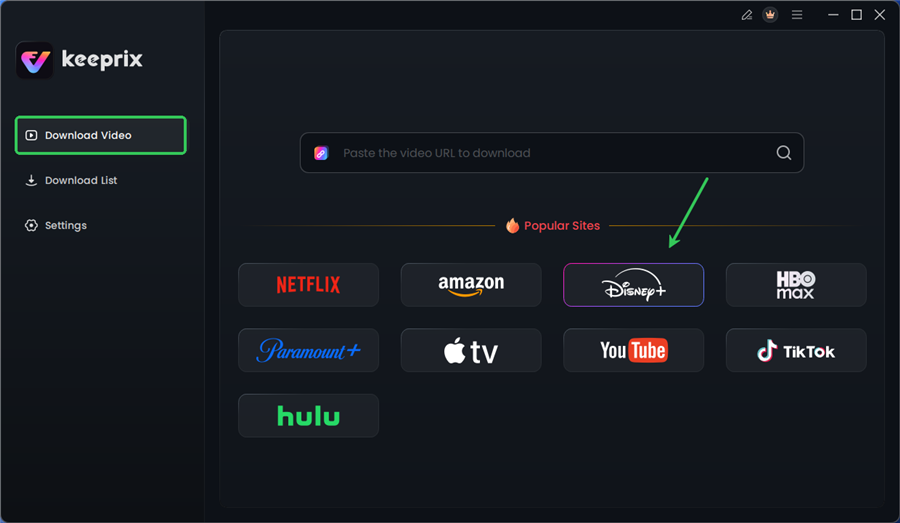
Choose Disney Plus in Keeprix
Step 3. Log in to your Disney+ account.
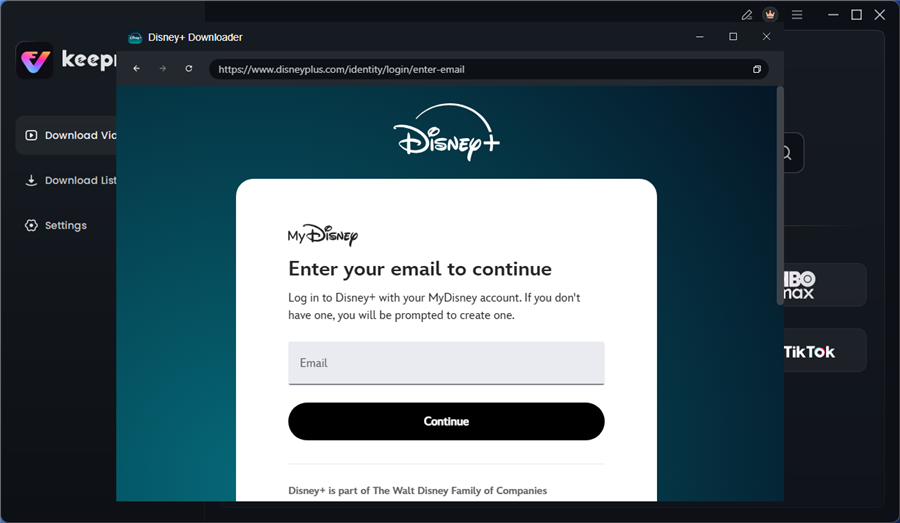
Log in to Disney Plus Account
Step 4. Search for the movies or series you’d like to download. Then click the download button to save it directly to your computer.
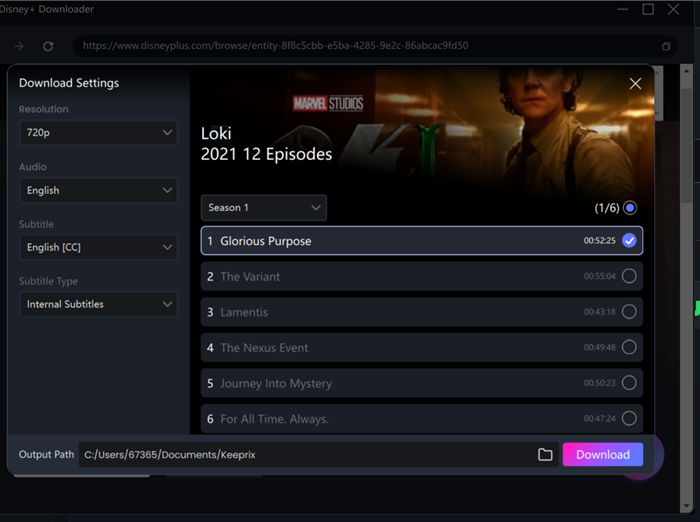
Configure Download Settings
After downloading, you can access the downloads in your local folder. The downloaded content is decrypted, and you can keep it forever.
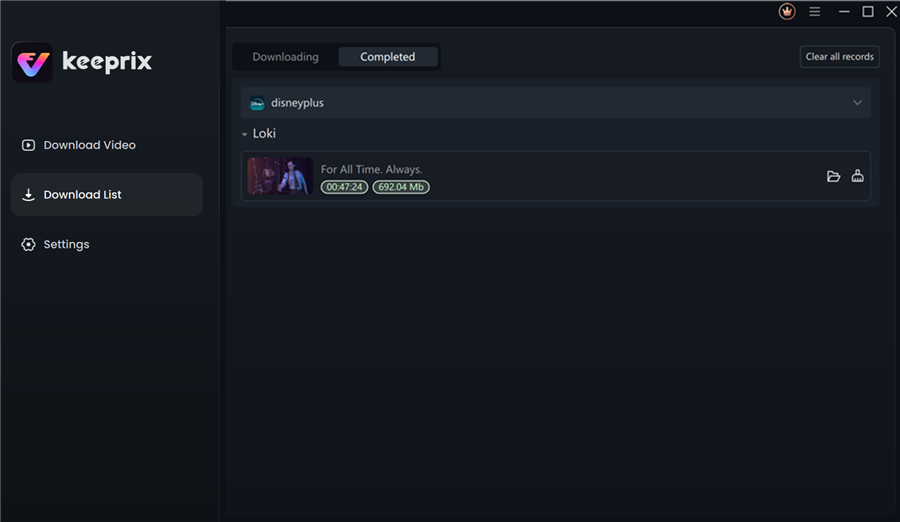
Disney Plus Downloaded Videos in Keeprix
FAQ: Common Questions About Disney Plus Commercials
1. Does Disney Plus have ads now?
Yes. The “Basic” plan includes ads. The “Premium” plan does not (for on-demand content).
2. How long are the ads on Disney Plus?
You can expect about 4 minutes of ads per hour of content. This is generally lower than traditional cable TV or Hulu’s ad load.
3. Is there an ad-free version of Disney Plus?
Yes, the Disney+ Premium plan is ad-free. It currently costs approximately $6 more per month than the Basic plan.
4. Do all shows and movies have ads on the Basic plan?
Most do. However, profiles set to “Junior Mode” generally do not show ads for specific preschool content to comply with privacy regulations.
5. Can I switch from ad-supported to ad-free?
Yes. You can upgrade your plan in your account settings. You will usually be charged a prorated amount for the remainder of the month to unlock ad-free streaming immediately.
6. Does the Disney Bundle include ads?
It depends on the bundle. The “Duo Basic” and “Trio Basic” bundles include ads on Disney+. You must select a “Premium” bundle to remove them.
Conclusion
Understanding does disney plus have ads is no longer a simple yes or no question—it is a financial calculation.
- If you are on a strict budget: The Basic plan at ~$9.99 is a viable option. The ads are present (marked by yellow dots) but not overwhelming compared to broadcast TV.
- If you value immersion: The Premium plan at ~$15.99 is the standard route to remove interruptions.
- If you want permanent access: Tools like Keeprix Downloader offer a way to secure ad-free content permanently, though they require a different workflow than simple streaming.
You do not have to accept a viewing experience that feels cluttered. Whether you choose to upgrade your tier or utilize downloading tools to curate your own library, clarity is your best tool for managing your entertainment budget in 2025.
Long-term Support: “The pricing and features listed in this guide are accurate as of early 2025. We regularly monitor Disney+ interface updates and Keeprix Downloader compatibility to ensure these recommendations remain effective.”