Is Disney Plus Free with Amazon Prime? – Answered

The confusion is entirely understandable. You turn on your Fire TV, see the Disney+ icon sitting right next to your Prime Video library, and assume they are part of the same package. For users like Emily, a long-time Prime member, this leads to significant frustration: clicking the app expecting immediate access, only to be blocked by a login screen demanding a new credit card. This isn’t just a minor annoyance; it disrupts your evening and creates uncertainty about what you are actually paying for.
Is Disney Plus free with Amazon Prime? The direct answer is no. While the app is readily available on Amazon devices, the subscription is not included in your Prime benefits. Users frequently search “does Amazon Prime include Disney+,” hoping for a hidden bundle, but these two services currently require separate payments.
However, just because they aren’t free doesn’t mean you can’t save money or streamline your setup. This guide clarifies the separation, highlights the best real-world bundles to lower your monthly bill, and offers an advanced method for users who want to build a permanent offline library with a Disney Plus downloader.
Is Disney Plus Free with Amazon Prime
Why Are Prime Video and Disney Plus Separate? (The Licensing Ecosystem)
To navigate the streaming landscape effectively, it is vital to understand the business logic behind the screen. Many users ask, “Is Disney+ part of Prime membership?” because they are accustomed to Prime Video Channels.
Amazon allows you to subscribe to networks like Starz, Max (formerly HBO), or Paramount+ directly through the Prime dashboard. In these cases, Amazon handles the billing, and the content plays inside the Prime Video player. This creates a seamless experience where add-ons seamlessly integrate with the bundle. However, Disney Plus operates under a completely different licensing ecosystem.
The Walled Garden Strategy
Disney utilizes a direct-to-consumer model. They prefer to manage their own subscriber data, revenue, and viewing analytics rather than sharing that control with Amazon. Therefore, no Amazon Prime Disney Plus bundle currently exists.
When you see Disney+ on your Fire TV, you are looking at a standalone application. It is merely hosted on Amazon’s hardware, similar to how an app lives on an iPhone. Think of the Fire Stick as the landlord (hardware) and Disney as an independent tenant (software). The landlord lets the tenant live there, but the rent is paid separately. This distinction provided the “Aha!” moment for Emily: seeing the app icon guarantees availability, not entitlement.
Legitimate Ways to Save: The Best Bundles for 2025
Since Amazon does not offer a free pass, the smartest move for a budget-conscious viewer is to look for streaming subscription bundles that actually exist. You don’t have to pay full price for everything. If you are trying to recreate a cable-like experience without the cost, here are the most effective, legitimate ways to bundle Disney+ in 2025.
1. The “Disney Bundle” (Hulu, Disney+, ESPN+)
This is the gold standard for value. Instead of paying for Disney+ alone, you can bundle it with Hulu and ESPN+.
- Who it’s for: Families who want cartoons (Disney), sports (ESPN), and current TV dramas (Hulu).
- The Savings: By grouping these, you typically save roughly 30-40% compared to subscribing to each individually. You can access this directly through Disney or Hulu’s website, and then simply log in to the respective apps on your Fire TV.
2. The Disney+ and Max Bundle
New for late 2024 and moving into 2025, Disney and Warner Bros. Discovery launched a cross-platform bundle.
- Who it’s for: Movie buffs. This combines the Marvel/Star Wars catalog with the HBO library (Game of Thrones, Harry Potter).
- The Experience: While you still use separate apps on your Fire TV, the billing is unified, and the combined price is significantly lower than two separate premium subscriptions.
3. Hidden Carrier Perks (Verizon & T-Mobile)
Before you pull out your credit card, check your mobile phone plan.
- Verizon: Often includes the Disney Bundle (Disney+, Hulu, ESPN+) for free with their top-tier unlimited 5G plans.
- T-Mobile: Frequently offers “Hulu on Us” or discounted streaming add-ons.
- O2 (UK): Select plans offer Disney+ as a chargeable “Extra” that can sometimes be credited back depending on your contract.
Pro Tip: If you have an American Express Platinum or Blue Cash Preferred card, check your “Digital Entertainment Credit.” You may be eligible for up to $20/month in statement credits for Disney Bundle subscriptions, effectively making the service free.
Disney Plus Pricing vs. Prime Video: 2025 Cost Breakdown
Understanding the financial commitment is crucial for managing your monthly budget effectively. Since there is no free bundle, you need to look at Disney Plus pricing and Prime membership benefits side-by-side to determine the best combination for your wallet.
Disney+ Pricing Tiers
Disney+ generally offers two main tiers (prices subject to change):
- Disney+ Basic (With Ads): A lower monthly cost that grants access to the full library but includes interruptions.
- Disney+ Premium (No Ads): A higher monthly fee for an ad-free experience and the ability to download content within the mobile app for temporary offline viewing.
You may also like: How to get rid of ads on Disney Plus
Amazon Prime Video Options
- Prime Video Standalone: A specific subscription just for the video service.
- Full Amazon Prime Membership: Includes shipping benefits, Prime Music, and Prime Video.
Strategic Budgeting
To manage these costs, many users mix and match. For instance, you might pair a Full Prime Membership (for shipping and video) with a Disney+ Basic plan to keep total costs down. If ads bother you, consider the bundles mentioned above rather than upgrading the standalone plan—you often get more content for the same price upgrade.
Setup Guide: How to Watch Disney+ on Amazon Fire TV
If you have secured your subscription (either directly or via a bundle) and are wondering what apps do I need to watch Disney Plus, here is the procedure to bridge the gap. While the billing is separate, the viewing experience happens on the same device.
Step-by-Step Installation
- Navigate to Home: On your Fire TV Stick remote, press the Home button.
- Search: Scroll to the left to the magnifying glass icon or press the voice button and say “Disney Plus.”
- Select the App: You will see the Disney+ icon (blue background with the white logo). Crucial Step: Ensure you are selecting the standalone app under “Apps & Games,” not a Prime Video search result that suggests buying a movie.
- Download: Click “Get” or “Download”.
- Log In: Once installed, open the app. Enter the email and password you created for your Disney+ account. You cannot use your Amazon login credentials here.
Emily found that once she logged in, the Fire TV remembered her credentials, making the switch between Prime Video and Disney+ seamless on a day-to-day basis.
Advanced Option: Building a Permanent Offline Library
For 90% of users, the bundles and setup guide above are the best solution. However, there is a specific group of users—frequent travelers, rural residents with spotty internet, or collectors who face a different problem: expiration dates and offline limits.
Standard streaming apps have restrictions. Downloads often expire after 48 hours, and you can’t move them from your phone to a laptop. If you want to own your library rather than just rent it, you might consider an archiving tool like Keeprix Downloader.
What is Keeprix?
Keeprix is a software tool for Windows and macOS that allows you to download video files from streaming services (like Disney+ and Amazon Prime) as permanent MP4 or MKV files.
Why Consider Archiving?
- True Offline Access: Unlike the app’s offline mode, these files never expire. This is ideal for long flights, road trips, or military deployments where the internet is nonexistent for weeks.
- Backup Your Favorites: Shows get removed from streaming platforms constantly. Archiving ensures you have a copy of Willow or Westworld even if the service deletes it.
- Ad-Free Experience: The software processes the video stream to save the file without commercials, which can be useful if you are on a Basic ad-supported tier.
Steps to Download Disney+ Videos with Keeprix Downloader
Step 1. Download Keeprix Downloader and install it on your Windows or Mac computer.
Step 2. Launch the software and choose Disney Plus on the main screen.
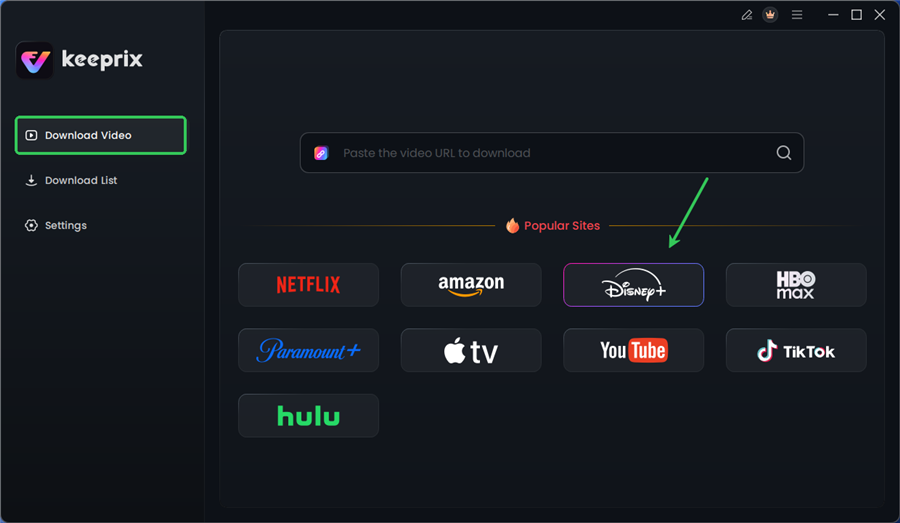
Choose Disney Plus in Keeprix
Step 3. Log in to your Disney+ account.
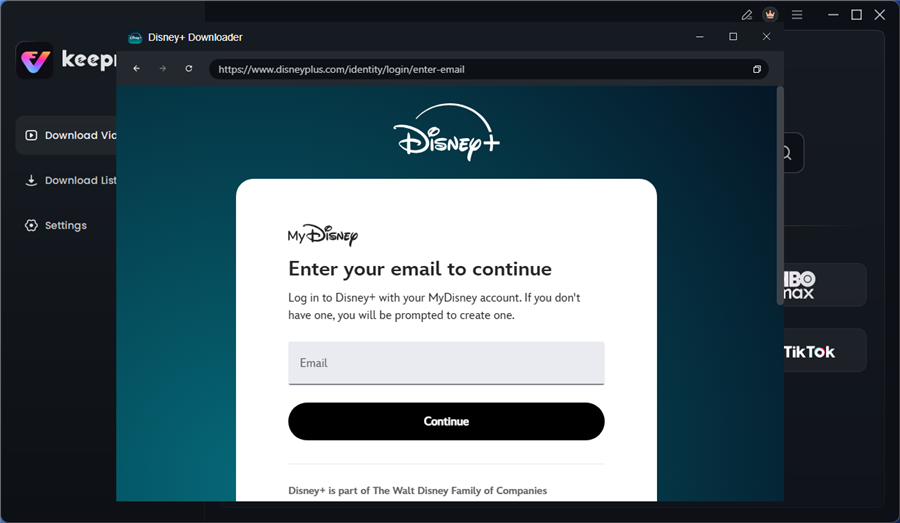
Log in to Disney Plus Account
Step 4. Search for the movies or series you’d like to download. Then click the download button to save it directly to your computer.
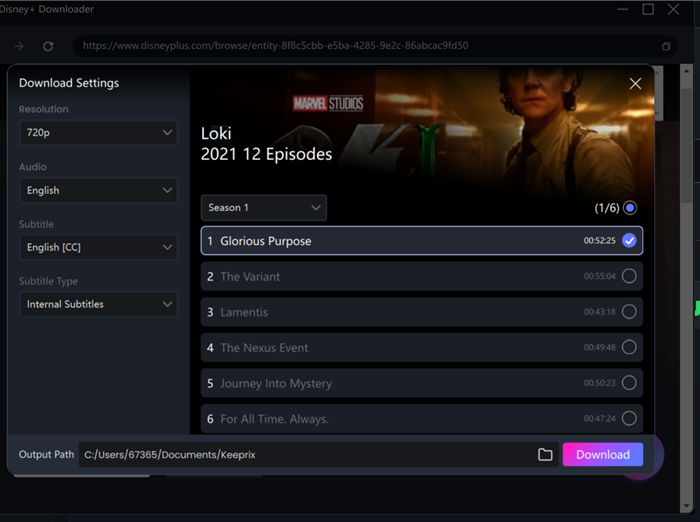
Configure Download Settings
After downloading, you can access the downloads in your local folder. The downloaded content is decrypted, and you can keep it forever.
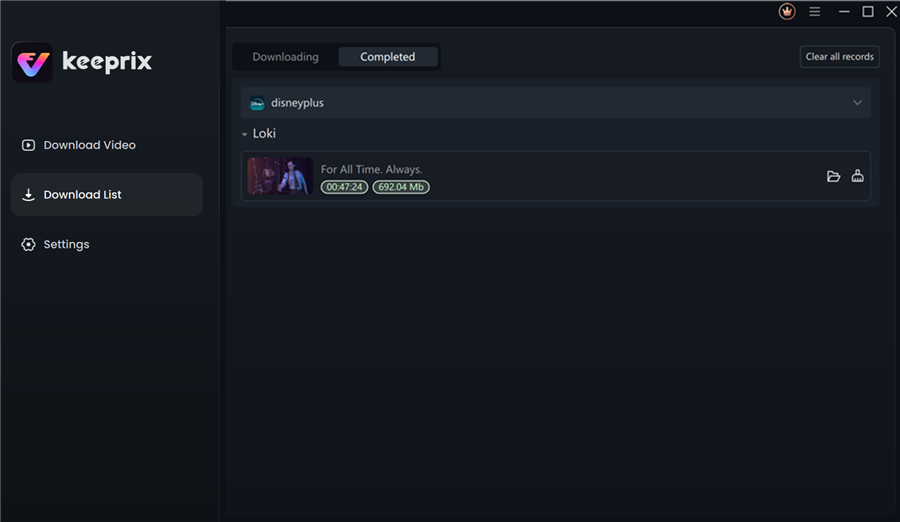
Disney Plus Downloaded Videos in Keeprix
The Technical Gap: How to Watch on Your TV
A common frustration with downloading software is getting the movie from your computer to your living room TV. Here is how to bridge that gap:
- The USB Method (Easiest): Copy your downloaded MP4 files onto a USB flash drive. Plug the drive directly into the USB port of your Smart TV or into an adapter on your Fire TV Stick. Use an app like VLC for Fire TV to play the files.
- The Plex Method (Best Interface): Install Plex Media Server (free) on your computer and point it to your Keeprix download folder. Install the Plex App on your Fire TV. This creates a beautiful, Netflix-like menu for your own personal library that streams instantly from your computer to your TV over your home Wi-Fi.
- The HDMI Method: Simply connect your laptop to your TV via an HDMI cable.
Legal & Safety Note: Keeprix is a powerful tool, but it should be used responsibly. It is intended for personal archiving of content you legally subscribe to. Bypassing DRM (Digital Rights Management) may violate the Terms of Service of streaming platforms. Always ensure you have a valid subscription and use the tool for personal, private viewing only.
Frequently Asked Questions About Streaming Subscription Bundles
To ensure you have all the facts regarding streaming subscription bundles, here are answers to the most common queries.
Does Amazon offer discounts for Disney Plus?
Generally, no. Amazon does not offer standard discounts for Disney+. However, keep an eye on Prime Day deals, as Amazon sometimes offers “credits” for streaming services when you buy specific hardware (like a new Fire TV Stick), though these are rare.
Can I subscribe to Disney+ through Amazon Prime Channels?
No. As discussed, Disney+ is not available as a Prime Video Channel. You must subscribe directly through Disney or via the bundles mentioned above (Hulu/Verizon).
Are there any promotions linking Prime and Disney+?
While no direct Amazon Prime Disney Plus bundle exists permanently, using a credit card with “streaming rewards” is the closest workaround. Cards like the Amex Blue Cash Preferred offer 6% cash back on US streaming subscriptions, which applies to both Prime Video and Disney+.
How does Disney Plus pricing compare to Prime Video?
Disney+ and Prime Video (standalone) are competitively priced, usually within a few dollars of each other. However, Prime Video is often viewed as a “value add” to the shipping membership, whereas Disney+ is a dedicated content purchase focused heavily on franchise IP (Marvel, Star Wars, Pixar).
Conclusion: Taking Control of Your Content
The realization that Disney+ is Disney Plus free with Amazon Prime yields a “no” can be disappointing, especially when app icons suggest a unified system. But understanding the difference between the “Landlord” (Amazon) and the “Tenant” (Disney) empowers you to make better choices.
You don’t need to overpay. By taking advantage of the Disney Bundle, checking your mobile carrier for perks, or using credit card points, you can significantly lower the cost of accessing both libraries. For those who need absolute control and offline permanence, tools like Keeprix offer a robust “Plan B.”
Whether you stick to the official apps or build a private archive, the goal is the same: enjoying your favorite stories on your terms, without the confusion.